




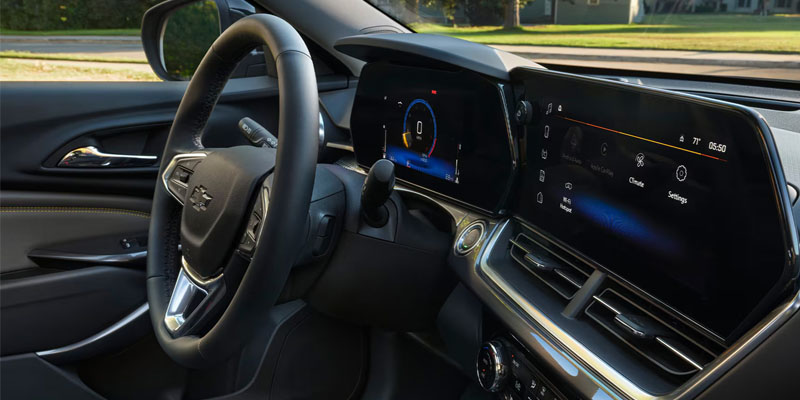
There’s a moment in every modern car where you stop driving and start negotiating. Not with traffic, but with the screen. Menus, submenus, icons that seemed obvious five minutes ago but now feel like a logic puzzle designed by someone who doesn’t drive. Infotainment, at its worst, is distraction disguised as progress.
Chevrolet’s system mostly avoids that trap. Not entirely. Nothing does. But it gets closer than most to something that feels… practical.
What Actually Matters in Chevy Infotainment
Tap the screen and something happens. Immediately. No hesitation, no second guess about whether you pressed hard enough or in the right place. That alone separates a good system from an annoying one.
Then there’s layout. Large icons, clean structure, and just enough information on screen without turning it into a control center for a spaceship. You’re not learning a new device. You’re interacting with something that feels familiar within seconds.
Apple CarPlay® and Android Auto™ are central to this. Not as optional add-ons, but as core functionality. Plug in, connect wirelessly, and your phone becomes the interface you already understand. Music, messages, navigation. No translation required.
Connectivity That Feels Built In, Not Bolted On
The available 4G LTE Wi-Fi hotspot is one of those features people underestimate until they use it. On paper, it’s just internet in the car. In practice, it changes how passengers behave. Tablets stay connected. Laptops actually work. Long drives feel shorter because everyone’s occupied with something other than asking how much longer it will be.
Then there’s the MyChevrolet mobile_app. Remote start, vehicle status, service scheduling. It’s less about novelty and more about removing small inconveniences. You don’t think about it much. You just use it when you need it. Which is exactly the point.
Where It Intersects with Safety
This is where things tend to go wrong in other systems. Too much information, poorly delivered, at exactly the wrong time.
Chevy’s approach is more measured. Voice recognition handles basic commands without pulling your attention away. You speak, it responds, and you move on. No need to scroll through menus while driving.
Integration with OnStar adds another layer. Diagnostics, emergency assistance, background support that operates quietly until it’s needed. It doesn’t demand interaction. It just exists, ready.
Driver-assistance alerts feed into the display as well, but without overwhelming it. Clear, concise, and then gone. Information, not interruption.
Experience in Carthage, MS
In day-to-day driving around Carthage, this all translates into something simple. Less time figuring things out. More time just using them. You get in, connect your phone, set your route, and go. The system doesn’t become the focus of the drive. It supports it. Which, oddly enough, still feels like a bit of a luxury.
See It for Yourself at Triple M Motors
Infotainment is difficult to judge on a spec sheet. It either works for you within a few minutes, or it doesn’t. Here at the dealership, the latest Chevrolet models give you the chance to try it properly. Tap through the menus. Connect your phone. Use it the way you would. Because the best systems aren’t the ones with the most features. They’re the ones you stop noticing altogether.
Connect with us


- 2026 Canyon
- 2026 Chevy Trailblazer
- Carthage Chevrolet Dealer
- Carthage Chevrolet Service
- Carthage GMC Dealer
- Carthage GMC Service
- Chevrolet Blazer EV
- Chevrolet Colorado
- Chevrolet Equinox
- Chevrolet Malibu
- Chevrolet Silverado 1500
- Chevrolet Silverado 2500 HD
- Chevrolet Tahoe
- Chevrolet Traverse
- Chevrolet Trax
- GMC Acadia
- GMC Canyon
- GMC Financing
- GMC Sierra 1500
- GMC Sierra EV
- GMC Terrain
- GMC Yukon
- GMC Yukon XL
- Triple M Motors Service